
Wheelz Payment Methods
Wheelz Casino payment methods for Canada: Interac, Visa, Mastercard, Apple Pay and MiFinity, with C$10 minimum deposits and C$20 minimum withdrawals.
Jump to
Bank rails: Interac and bank payouts
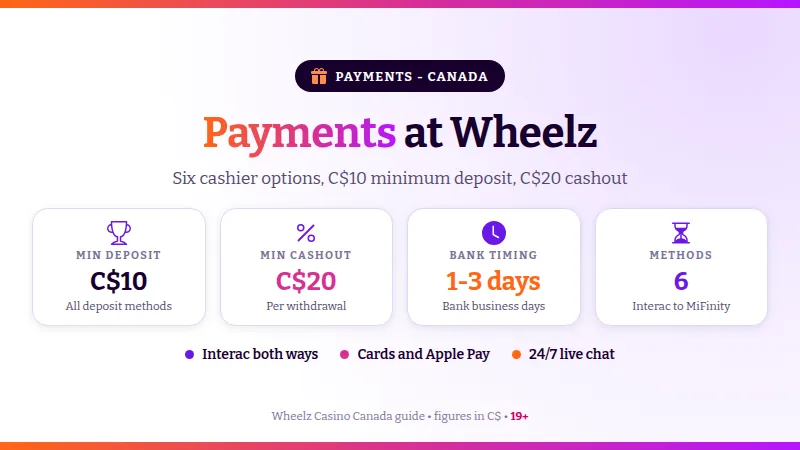
Wheelz Casino runs a six-option cashier for Canadian players: Interac, Interac eCashout (withdrawals only), Visa, Mastercard, Apple Pay and MiFinity. Deposits start at C$10 and withdrawals at C$20. Bank payouts take 1-3 business days. A debit card is the safest card choice, because credit card deposits can be treated as cash advances.
For most Canadian players the bank route is the natural starting point. The Wheelz cashier for Canada lists two Interac options. Standard Interac works in both directions, so you can fund your balance and send winnings back to the same bank account. Interac eCashout is a withdrawal-only option: it shows up when you cash out, but not when you top up. Both sit next to the card and wallet options, and the cashier shows what is available on your account the moment you open it. The Canadian terms set the minimum age at 19, so have your account details verified and ready before your first payment.
- Deposits and withdrawalsInterac
- Withdrawals onlyInterac eCashout
- C$10Minimum deposit
- C$20Minimum withdrawal
- 1-3 business daysBank processing
The 1-3 business day window is the time your bank needs to land the money, and it counts working days only. A withdrawal requested late on a Friday will not move over the weekend on the bank side, so a Monday or Tuesday arrival is perfectly normal. If you need funds by a specific date, such as rent or a card bill, request the payout a few days early instead of on the last evening. The same logic applies around statutory holidays, when banks across Canada pause settlement and the count simply starts again on the next working day.
- Step 1
Open the cashier
Log in to your Wheelz account and choose Deposit from the menu.
- Step 2
Pick Interac
Select Interac from the list of payment options shown for Canada.
- Step 3
Enter the amount
Type the sum in C$. The minimum deposit is C$10, so anything below that will not go through.
- Step 4
Approve at your bank
Confirm the payment through your own online banking, as you would for any Interac payment.
- Step 5
Check your balance
Return to the lobby, confirm the C$ amount has arrived and, if you want the welcome offer, accept it in My Rewards.
Use a bank account that is in your own name. Payment checks match the account holder to the player profile, and a mismatch tends to slow things down at any casino. Interac eCashout is worth remembering when a card withdrawal is not accepted by your bank, because it sends the money through the banking network and does not depend on the card issuer's rules. Either way, withdrawals begin at C$20, so a very small balance has to grow slightly before it can be taken out.
Wallets: Apple Pay and MiFinity
Two entries in the Canadian cashier are not plain bank or card payments. Apple Pay lets you pay with a card stored on your iPhone or other Apple device. You confirm with Face ID, Touch ID or your passcode, so there is no card number to type and no billing form to fill in. It is quick and tidy, but it is still your card behind the scenes. That means the same bank rules apply: a debit card behind Apple Pay behaves like a debit card, and a credit card behind it behaves like a credit card.
MiFinity is an eWallet, a separate account that sits between your bank and the casino. You fund the wallet first, then pay Wheelz from the wallet balance. The benefit is separation: casino payments appear as wallet activity instead of as a string of lines in your main account history. The trade-off is one extra step and one more account to manage. The wallet provider may have its own charges for loading or moving money, so check its fee page before you commit larger sums.
Pros
- Apple Pay needs no card number typing, only a quick biometric confirmation
- MiFinity keeps casino spending apart from your everyday bank account
- Both can be reused for later deposits once they are set up
Cons
- Apple Pay uses the card behind it, so credit card cash advance rules still apply
- MiFinity needs its own account and a top-up step before you can play
- The wallet provider may apply its own fees, separate from the casino
If you used Skrill or Neteller at other sites, they are not part of the Canadian cashier: MiFinity is the wallet option here. The same goes for PayPal, Google Pay, Paysafecard and cryptocurrencies, which are not listed. That keeps the choice short and easy to read, and it means you can sort out your method in a minute: Interac for a direct bank link, a debit card or Apple Pay for speed on a phone, MiFinity if you prefer a wallet. Pick one primary method and stay with it, which also makes your payment history easier to follow.
A practical note on setup: before your first MiFinity deposit, open the wallet, make sure it is verified with the provider and load it in Canadian dollars if the option is offered. Doing this in advance means you are not stuck at the cashier with an empty wallet and a half-finished payment. With Apple Pay the equivalent step is checking that the right card is set as the default in your phone's wallet app, so the payment does not go to a card you did not intend to use.
Debit cards: Visa and Mastercard
Visa and Mastercard are both in the Canadian cashier. The minimum deposit is C$10 and the minimum withdrawal is C$20, the same as for the other methods. Cards are familiar and immediate to set up: you enter the number, expiry date and security code once, and later deposits take seconds. For Canadian players the question is rarely whether a card works, but which kind of card to use, and here the answer is a debit card, which takes the money straight from your chequing account.
The reason is how Canadian banks classify gambling payments. A credit card deposit counts as a cash advance on many cards, which can mean a fee at the time of the payment and interest that starts on day one with no grace period. The casino cannot change that, because it is your issuer's rule. A debit card avoids the problem completely and gives you a clearer picture of what you actually spend. It also keeps casino play inside the money you already have, which is a sensible habit for any entertainment budget.
- Use a debit card for deposits and keep credit cards for everyday purchases
- Check your issuer's cash advance policy if you ever pay with a credit card
- Enter the card holder name exactly as it appears on the card
- Use the same card for withdrawals where you can, so the payout has an obvious route back
- Turn on app notifications from your bank so each payment is confirmed instantly
- Complete any 3-D Secure prompt your bank sends, because an ignored prompt cancels the payment
The cashier carries a note that some Canadian banks may not permit withdrawals to credit cards. If a card withdrawal is refused, Interac eCashout is the alternative to try.
A card withdrawal follows the same minimum of C$20 and the same bank timing of 1-3 business days. The money returns to the card account, not to your chequing account directly, so look for it in the card history. If you hold both a debit and a credit card from the same bank, double-check which one you picked in the cashier before confirming. It is an easy slip on a phone screen and it is the most common reason players meet an unexpected cash advance charge.
It also helps to know that the name on the card has to match the name on your Wheelz profile. Cards issued in someone else's name, even a partner's or a relative's, are the classic reason for a stalled payment at any online casino. If you have recently received a replacement card with a new number or expiry date, remove the old one from your saved payment details and add the new card, so that the cashier does not try the expired one first.
Why a payment gets declined
A declined payment is annoying but almost always fixable, and the cause is usually on the banking side rather than at the casino. The refusal message from the cashier is short, so it helps to know the typical reasons in advance. Work through the list below from top to bottom, because the first three explain most failed attempts. Keep the exact time and amount of the attempt in mind, as they are the details anyone helping you will ask for first.
It also helps to separate two kinds of failure. In the first, the cashier itself turns the payment away, usually because of an amount below the minimum or a field that was filled in wrongly. In the second, the request reaches your bank and the bank says no. The second kind leaves a trace in your banking app, often as a declined or pending line, which is why checking the app is the fastest way to tell which side stopped the payment.
Bank gambling block
Some banks and card issuers block gambling merchants by default. A quick message in your banking app or a call usually lifts it for your own account.
Credit card cash advance
A credit card deposit counts as a cash advance. Some issuers refuse it or stop it at a lower limit, so a debit card is the cleaner option.
Amount below minimum
Deposits start at C$10 and withdrawals at C$20. Anything under those amounts is turned away before it reaches your bank.
Card details mismatch
A wrong expiry date, security code or holder name makes the check fail. Re-enter the details slowly instead of relying on autofill.
Daily bank limit
Your bank may cap online card or Interac spending per day. If you hit the cap, wait for the reset or raise the limit in your banking app.
Unfinished 3-D Secure
The bank sends a confirmation prompt. If it is ignored or times out, the payment is cancelled and has to be started again.
Read the message
Note whether the cashier or the bank refused the payment and write down the amount.
Check your bank app
Look for a blocked or pending line and for any security alert waiting for a reply.
Try another method
Switch from card to Interac, or the other way round, to see whether the problem sits with one route.
Contact live chat
Support is available 24/7 through live chat. Give the time, the method and the C$ amount.
Avoid pressing the deposit button again and again. Repeated attempts in a short time can look unusual to a bank's fraud system and may lead to a temporary block on the card, which then takes longer to clear than the original problem. One careful retry after you have checked the points above is enough. If it fails again, change the method and ask support before making a third attempt.
All Wheelz payment methods in one table
The table below puts the six cashier options for Canada on one screen. It shows the direction of each method, the minimum amounts and the timing at the bank. Read it before your first deposit, then keep it in mind when you plan a withdrawal, since the available route for cashing out is not always identical to the one you used to deposit. Where the cashier decides the detail for your account, the cell says so instead of guessing.
| Method | Direction | Min deposit | Min cashout | Timing |
|---|---|---|---|---|
| Interac | Both ways | C$10 | C$20 | Bank 1-3 days |
| Interac eCashout | Cashout only | N/A | C$20 | Bank 1-3 days |
| Visa | See cashier | C$10 | C$20 | Bank 1-3 days |
| Mastercard | See cashier | C$10 | C$20 | Bank 1-3 days |
| Apple Pay | See cashier | C$10 | See cashier | See cashier |
| MiFinity | See cashier | C$10 | C$20 | See cashier |
Per-transaction maximums and any provider fees are shown in the cashier before you confirm, so check them there. Your own bank or wallet may add its own charges. Timing counts business days only.
Two things stand out. First, every deposit method starts at the same C$10, so you do not need to compare minimums when choosing between them. Second, cashing out always starts at C$20, which is double the entry point for deposits. Keep a small buffer above that line if you plan to withdraw soon, and remember that the bank leg takes 1-3 business days after the request has been made.
When you compare the rows, think about the whole round trip and not only the deposit. A method that is convenient for paying in is only half of the picture if you cannot use it to take money out. Interac covers both directions, which makes it the simplest loop for many players. Cards and wallets add flexibility, but check the cashier for the cashout route before you decide to rely on one of them as your only method.
Minimum deposits and the welcome offer
The payment method you choose does not change the welcome offer, but the deposit amount does matter. The Canadian offer is a 400% Balance Booster up to C$20 plus 100 free spins. The C$20 is the ceiling on the deposit that earns the bonus, not on the bonus itself. The offer is not applied automatically: you accept it in My Rewards, and only one bonus applies per deposit.
- Minimum deposit
- C$10
- Deposit counted for bonus
- Up to C$20
- Largest bonus
- C$80
- Wagering
- 35x deposit plus bonus
- Free spins
- 10 a day for 10 days
- Welcome bonus lifetime
- 60 days
The 35x requirement applies to the deposit and the bonus together. A C$10 deposit therefore means C$1,750 in total bets (35 x C$50), and a C$20 deposit means C$3,500 (35 x C$100). The maximum bet while a bonus is active is C$5 per spin. Slots count 100% towards the requirement, while table and live games count 50% and video poker counts 0%. Several titles are excluded completely, so read the bonus terms before you pick a game, and use a deposit size that matches how long you want to play.
If you would rather test the lobby before putting any money in, the demo mode lets you try slots with play money. The free spins page explains how the 100 spins arrive, in batches of ten at C$0.10 each over ten days. Each batch lives for 24 hours, so log in on the days you plan to use them. Wins from spins become bonus money with the 35x requirement on the winnings.
- Pragmatic Play
- Evolution
- Play'n GO
- Push Gaming
- NetEnt
- Red Tiger
- Nolimit City
- Relax Gaming
- Yggdrasil
- Thunderkick
- Booming Games
- Elk Studios
Once the deposit lands, the lobby offers over 6,000 games from studios like the ones above, so a small C$10 start still gives you plenty of choice. Since slots count in full towards the wagering, they are the simplest place to work through a bonus, while live and table games progress at half speed. Whatever you pick, keep an eye on the C$5 maximum bet and stay inside it while the bonus is active.
How payments look on your statement
Statement lines are written by your bank or card issuer, and the wording differs from one issuer to the next. Instead of hunting for one exact name, match payments on three things: the date, the amount in C$ and the card or account used. Wheelz Casino is operated by Granturo Malta Ltd, so a reference to that company in the transaction detail of your banking app is worth matching against your cashier history. Interac payments appear in your banking history as Interac transactions, and Apple Pay payments show the device account number instead of the full card number.
- Compare the date and C$ amount with the history shown in the Wheelz cashier
- Check which card or account was charged, especially if you hold several
- Look for separate lines when a wallet is used: one for the top-up and one for the payment to the casino
- Take a screenshot of the cashier confirmation for your own records
- Look for pending lines, which can sit there for a day or two before settling
- If a line looks unfamiliar, ask live chat before contacting your bank
Currency is worth a thought too. The account can be held in EUR, CAD or NZD, and picking CAD means deposits and withdrawals match the C$ amounts on your statement. A balance in another currency can add a conversion margin from your bank and make the numbers harder to reconcile. If you used MiFinity, keep in mind that the wallet has its own currency setting as well, so check that it is set to Canadian dollars to avoid a double conversion.
If you like to keep a tidy record, a simple note on your phone works well: the date, the method, the amount and whether it was a deposit or a withdrawal. After a month you can line it up against your bank statement in a couple of minutes and see exactly how much entertainment cost you. This habit also makes any conversation with live chat much quicker, because you can quote the date and amount straight away.
Common payment mistakes
- Depositing with a credit card and then finding a cash advance fee on the next statement
- Entering less than C$10 for a deposit or asking for less than C$20 as a withdrawal
- Forgetting to accept the welcome offer in My Rewards before or right after the deposit
- Planning a cashout for a date that falls inside the 1-3 business day window
- Using a bank account that is not in your own name
- Retrying a declined payment several times in a row instead of checking with the bank
- Leaving the account in a foreign currency and paying conversion costs
Most of these come down to checking one detail before pressing confirm. Look at the card type, the amount and the currency, and you will avoid the majority of problems. The other habit that helps is keeping your payment route simple: one deposit method, one withdrawal method, and a record of when you made each payment. If you are curious how we look at payment pages like this one, the how we test page explains it.
Set a deposit limit before you pay. Wheelz offers limits on time, net loss, deposits and bets, plus time-outs and self-exclusion. Free support is available from ConnexOntario and responsiblegambling.org.
Payments should stay inside an entertainment budget. If you notice that deposits are creeping up, use the limits in your account settings, which can be tightened at once and loosened only after a 24-hour delay. The Reality Check reminder is on by default at 60 minutes, and the Self-exclude for 24h button in the header gives you a quick break when you want one.
One more habit is worth building: decide on the amount before you open the cashier, not while you are looking at the balance. A figure chosen in advance, even a modest one like C$10 or C$20, keeps the session calm and makes it easy to stop when the money you set aside has been used. If you want to know more about the operator and the site behind the cashier, the about page has the background.
Before and after: payment assumptions
| Before | After |
|---|---|
| Credit card | Debit card |
| Any deposit amount | C$10 minimum |
| Any cashout amount | C$20 minimum |
| Instant bank payout | 1-3 business days |
| Card only | Interac too |
| Currency left default | Play in C$ |
| Guess the reason | Ask live chat |
The left column is what many new players assume; the right column is what the Canadian cashier actually expects. Direction and timing for Apple Pay and MiFinity are shown in the cashier.
The biggest change in most players' habits is the switch from a credit card to a debit card or Interac. It removes the cash advance problem, makes payments easier to trace and fits with the way Canadian banks treat gambling transactions. The second change is expectations about timing: the cashier may show a payout as approved, but the bank still needs its 1-3 business days before the money reaches your account.
Once you have settled on a method, the process becomes routine. Deposit from C$10, play within the limits you set, and withdraw from C$20 through the route your bank accepts. If anything looks different from what is described here, the live chat team is available around the clock and can confirm what your account shows.
Wheelz payment questions
Which payment methods does Wheelz accept in Canada?
The Canadian cashier lists six options: Interac, Interac eCashout, Visa, Mastercard, Apple Pay and MiFinity. Interac works for deposits and withdrawals, while Interac eCashout is for withdrawals only. Open the cashier after logging in to see which methods are active on your account, since the available routes can differ by direction.
What is the minimum deposit and withdrawal at Wheelz?
The minimum deposit is C$10 and the minimum withdrawal is C$20. A payment below either amount will not be processed. If you want the welcome offer, remember that the deposit counted for the bonus goes up to C$20, so a deposit between C$10 and C$20 earns a matching share of the 400% Balance Booster.
How long do Wheelz withdrawals take?
Bank payouts take 1-3 business days, counted on working days only. A request made on Friday evening normally arrives early the following week. For Apple Pay and MiFinity, the timing is shown in the cashier. If you need the money by a certain date, request the withdrawal a few days in advance.
Can I deposit with a credit card at Wheelz?
Visa and Mastercard are accepted, but a debit card is the better choice. A credit card deposit counts as a cash advance with many Canadian issuers, which can bring a fee and interest from day one. The cashier also notes that some Canadian banks may not permit withdrawals to credit cards.
Why was my deposit declined?
The usual causes are a bank gambling block, a credit card cash advance restriction, an amount under C$10, wrong card details, a daily bank limit or an unfinished 3-D Secure prompt. Check your banking app first, then try another method such as Interac. If it still fails, contact live chat with the time and amount.
Which currency should I use at Wheelz?
Choose CAD. The account supports EUR, CAD and NZD, and playing in C$ keeps your deposits and withdrawals in line with your bank statement. A different currency can add a conversion margin from your bank or wallet and make it harder to match payments with your cashier history.
Does Wheelz have a phone line for payment problems?
Support runs 24/7 through live chat and email, in English and Finnish. There is no phone line for players. For a payment issue, live chat is the quickest route: have the date, the method and the C$ amount ready, and keep a screenshot of the cashier confirmation if you have one.
Keep Reading
Take Your First Spin at Wheelz
Join Canadian players at Wheelz Casino. Claim your 400% Balance Booster up to C$20 plus 100 free spins and start playing today.